
Configuration of alarm management
The Alarms tab replicates some configuration sections of the X Editor Alarm Configuration window (which cannot be activated on a client station), allowing you to change the settings related to the management of the alarms for the client station. The tab is shown in the figure:
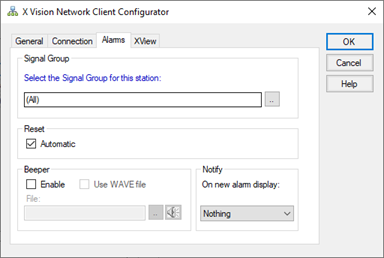
In particular, it is possible to define:
- The reporting group for each station
- The alarm reset mode
- The enabling and the mode of execution of the acoustic signal and of the announcer
For a detailed description of the configuration fields related to the Reset, Beeper and Notification sections, refer to the "Alarm Management" chapter of this Guide.
Selection of the signaling group
For each station it is possible to define the relevant signaling group: on the station will then be notified the only relevant events (activation of the beeepr and other notification devices, display of the Event Lists and Alarm Summaries).
For example, suppose to assign each client to the supervision of a plant area: by selecting an appropriate signaling group, it is possible to activate the beeper of each client exclusively for the alarms pertaining to the monitored area and display only the events of interest in the lists of Alarms and Event History.
All message groups are enabled on the server station.
To configure the Station Signaling Group belonging to the station, select the relevant button in the Signaling Group section. The system shows the window for selecting a group:
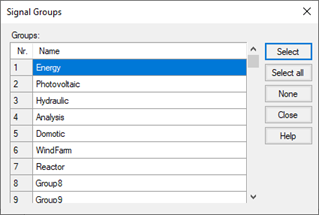
Select the desired group and click on Select, or select the Select All command to receive events relating to any message group.
Alarm reset mode
The automatic alarm reset function can be specific for each station, enabling or disabling the Automatic check box in the Reset section of the Alarms tab.
Enabling and execution of acoustic signals and notifications
The lower part of the Alarms tab allows you to change the settings of the horn and announcer. By default, the same settings configured for the server station are shown when the project is copied to the client.