
Configuration of overall expressions
To configure the Overall expressions of the project, select the Overall expressions item from the Configure menu of the X Editor, or double click on the node of the same name in the Project window. The system displays the Overall expressions window, shown in the figure:
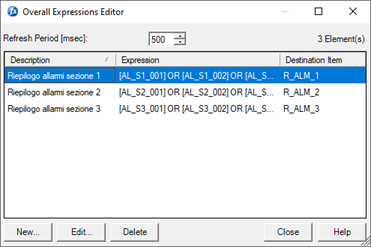
The window displays a list of the definitions of general calculations currently configured.
The New, Edit, Delete buttons allow you to enter, edit or delete a overall expressions.
The same commands are also available from the context menu.
The changes made are automatically saved when the window is closed.
Warning: Any changes made to the overall expression definitions have an immediate effect on the next scan. There is no need to restart the system.
Properties of an Overall Expression
The properties of a general calculation are configured in the relatedt property window, displayed during insertion or editing:
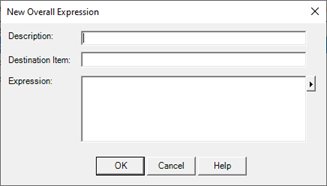
The property sheet contains the following fields:
|
Description |
It allows to introduce a free text that describes the purpose of the defined calculation. The compilation of this field is optional; it is however advisable to use this field to more easily identify the expressions inserted and their use.
|
|
Destination Item |
Name of the item to which the result of the expression is to be transferred. The compilation of this field is mandatory.
|
|
Expression |
Expression to be calculated, defined according to Syntax VBScript ™. For more information on expressions refer to the "Expressions and Scripts" chapter of this guide. |
Duplicating an Overall Expression
Duplicating an Overall Expression can be done using the Copy and Paste commands available from the context menu to generate an exact copy of the selected definition.
Change of processing period
The Update Period field in the Overall Expressions window displays and allows you to change the period in which the system processes the Overall Expressions. The parameter expresses the processing interval in milliseconds. The change in scan period becomes effective on the next scan.