
Configuring the menu position
You can define the location where the menu will be displayed, with respect to the animation that drew, selecting the Position command . The system shows the Popup Position window, which lets you select the desired positioning.
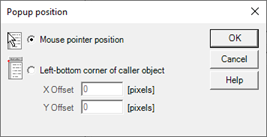
In particular, there are two placement options:
- Mouse pointer prosion: The position of the top left corner of the menu coincides with that of the mouse pointer, where you click
- Left-botom corner of the caller object: The menu is generated from the lower left corner of the caller animation, creating a "curtain" that allows you to replicate the look of the Windows menu.
You can specify any offset (Displacement) vertical and horizontal with respect to that position.