
Creating links to activate the client system
In the General tab, you can found the commands for creating the links for starting the supervision project on the client station.
Similar to the server station, links can be created either on the Desktop, to allow manual startup, or in the Windows Auto Run folder to automatically activate the system when the computer is started.
Note:the execution of the applications contained in Automatic Execution is subsequent to the login operation. For automatic restart on unattended stations it is suggested to disable the login request for the operating system. Refer to the documentation or online help of the Operating System for further details about disabling the login window.
Note: To start Windows without activating the applications in the startup group, hold down the Shift key during startup.
To generate a link, after selecting the project in the Project group, choose the Create command for the desired position:
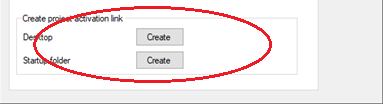
The system automatically generates a link in the indicated position, containing the appropriate command line to activate the selected project. A message informs about the success of the operation.
Any optional parameters must be added manually, according to the syntax provided for the command line, as described in the paragraph "Starting the supervisor on the client stations"
Note: while several links can be created on the desktop, each referring to a different project, only one startup connection can be inserted in Automatic execution; generating a new link the previous one is overwritten.