
Editing recipe elements
To insert a new element in the recipe, select an empty row in the elements table and select Properties from the context menu, or double click on the selected row. The system shows the Element Data entry window. Configure the item then select OK.
For information about the contents of the Element Data window, see Properties of an element later in this section.
If the table does not contain blank lines, select the Insert Row command from the Edit menu or from the context menu.
Note: the empty lines are ignored during the saving, sending and updating of the recipe.
To modify a recipe element, simply select the line relative to an existing element and push Modify, or double click the line.
Using the Erase command, you can delete the selected row or rows, regardless of their contents.
Note:it is not necessary to manually delete empty lines, as they are ignored.
Element properties
The Element Data window allows you to enter and modify the configuration of a recipe element:
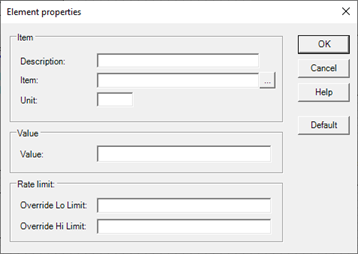
The window contains the following fields / commands:
|
Description |
Free text that describes the current element. The compilation of this field is optional. |
|
Item |
Specifies the item for which the value is to be set. Double click inside the field to view the item selection list. |
|
Unit of Measure |
Specifies the unit of measure in which the item value is expressed. The field is for descriptive purposes only and its compilation is optional. |
|
Value |
Value to be attributed to the item. |
|
Override low limit |
Specifies the expression that computes the lower limit of any override. Note: Because the field defines an expression, any decimal values must be entered using the decimal point (".") In place of the local separator. |
|
Override high limit |
Specifies the expression that computes the upper limit of any override. |
|
Default |
The Default command assigns the default data taken from the configuration of the item, as described in Assigning Defaults |
Defaults
Default command applies the following settings::
|
Field |
Setting
|
|
Description |
Description of the item specified in the Item field.
|
|
Unit of Measure |
Value of the Unit of Measure field of the item specified in the Item field (only items of the Analogue type)
|
|
Override low limit |
Value of the Minimum Value field of the item (only for items of the Analogue type)
|
|
Override high limit |
Value of the Maximum Value field of the item (only for items of the Analogue type)
|