
How to configure a menu
You can configure a menu using the Menu Editor window.
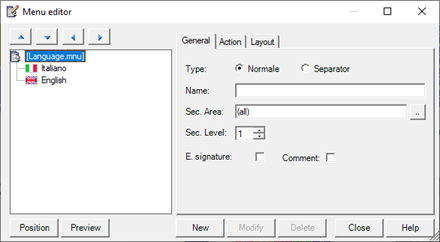
The window Menu Editor allows you to define the menu structure and the characteristics of the items that compose it.
The left part of the window contains a hierarchical display of the menu, while the right side contains fields for configuring individual entries.
Selecting an item in the hierarchical display the related configuration data is displayed in the configuration section (right) and can be modified.
The dialog has the following commands:
|
New |
Inserts a new menu item with the configured data in the right part of the window. The element is inserted as a "son" of the selected item. |
|
Modify |
Record modified data for the selected item. |
|
Delete |
Delete the selected itme and any subelements. |
|
Position |
Defines the location where the menu will be displayed (see "Configuring the location of the popup, "Later in this chapter). |
|
Preview |
Preview the menu. The associated commands are not executed. |
Note: functions New,Modify and Delete are also available from the context menu. The context menu also provides commands Copy and Paste for duplication of the menu items.
Note: The window Menu Editor supports drag and drop for changing the hierarchical relationships between the menu items.
The changes made are automatically saved when you close the window.