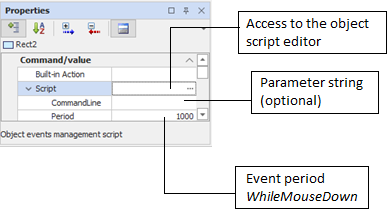
Object script
Each scriptable graphic object can be associated with a script in addition to executing a pre-built action.
The script allows you to define custom procedures for managing the events generated by the object in response to the mouse action, and in particular:
- Mouse pointer input in the area from the animation
- Exit mouse pointer from the animation area
- Pressing the mouse button at the animation
- Persistence of the key pressed on the animation (cyclical event)
- Release of the mouse button
- Mouse click (press + release of the button) or activation from the animation keyboard
- Double click on the animation
A string of parameters can be passed to the script by setting the CommandLine property in the animation properties. This string can be queried in the script with the CommandLine() function.