Page Script
The page script script are associated with a synoptic, which allow you to handle these events:
|
While opening the synoptic |
|
Generated periodically while the synoptic is displayed |
|
While closing of the synoptic |
and also:
|
Click the mouse in an area of the page is not occupied by objects |
|
Mouse double click on the background of the page |
|
Pressing the mouse button on the background of a page |
|
While moving of the mouse pointer on the background of the page |
|
Release the mouse button from the background of the page |
The OnInitialize procedure is performed each time the synoptic is opened.
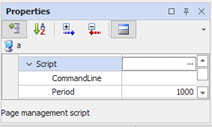
The OnTimer procedure is performed cyclically for all the time in which the synoptic is open. The execution period of the event is defined by the value assigned to the Period property for the page; you can change the period also internally to the script setting the Period variable to the desired value. In both cases, the period is expressed in milliseconds.
The OnTerminate procedure is performed when the page is closed.
The procedures for intercepting mouse events are used to manage the actions of the mouse on the page areas not occupied by graphic objects.
You can pass arguments to the script, setting the CommandLine property. This string can be queried within the script with the CommandLine () function.
To change the script of a synoptic select the button near Script entry (Animation category).