
Recipes configuration windows
The management window of the recipe module has different display according to the operating mode.
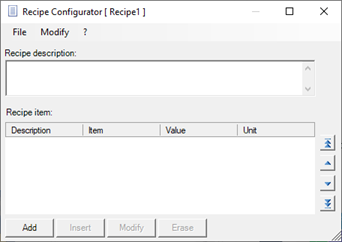
When creating a recipe during configuration, X Editor activates the module in Configurator mode:
When the recipe configuration window is lauched by XView, the window appears instead as shown below:
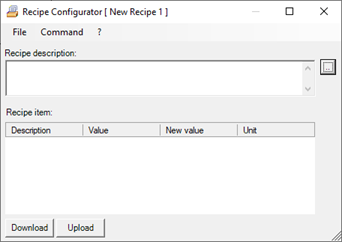
The Recipies Configurator window has the following fields and commands, differently available according to the operating mode:
|
File Menu |
Available only in Viewer mode: allows the opening and saving of recipe files
|
|
Commands Menu |
Available only in Viewer mode: allows execution of Upload and Download commands and edit of programmed values
|
|
Edit Menu |
Available only in Configurator mode.Make recipe editing tools available.
|
|
Recipe description
|
Allows you to enter a descriptive text for the recipe. |
|
Recipes items |
The parameter list contains the recipe parameters.
|
|
Download |
Available only in Viewer mode, it can also be selected from the Command menu. It allows to send (download) the recipe to the plc. For further information, refer to the chapter "Sending and updating the recipe".
|
|
Upload |
Available only in Viewer mode, it can also be selected from the Command menu. It allows to read (upload) the recipe from the plc. For further information refer to the chapter "Sending and updating the recipe".
|
|
Arrow keys |
Available only in Configurator mode, they allow to modify the order (and therefore of sending) of the parameters. For further information, refer to the chapter "Editing recipes", paragraph Changing the order of entering parameters. |