
Size properties of the page
The properties of the Size group, define the dimensions, in pixels, of the synoptic and the containing window.
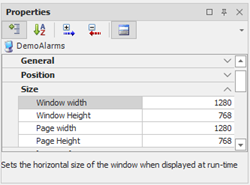
|
Window Width |
Horizontal size of the display window of the front panel display. If the Window Width is less than the Page Width, The window will be provided with a horizontal scroll bar; if higher, the window will be limited to the horizontal dimension of the synoptic. |
|
Window Height |
Horizontal size of the display window of the front panel display. If the “Window Height” is lower than ' Page Height, hhe window will be equipped with vertical scroll bar; if higher, the window will be limited to the vertical size of the synoptic. |
|
Page Width |
Defines the horizontal size of the synoptic. If this exceeds the size Window Width, The window will be provided with a horizontal scroll bar. |
|
Page Height |
Defines the vertical size of the synoptic. If this exceeds the size 'Height of window, The window will be equipped with the vertical scroll bar. |
Note: you can handle the automatic resizing of the synoptic depending on the size of the screen in X View by enabling the option Adjust Content in the General properties of the page.