
Starting the Scheduler configurator
To start the Scheduler Configurator module select the Schedule item from the Configure menu of the X Editor IDE. The system shows the scheduler configuration window:
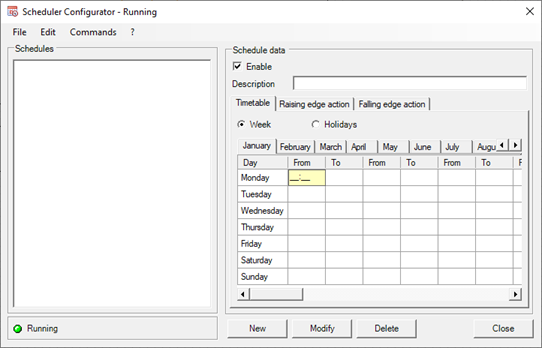
The general fields of the Schedule Configurator window are:
|
Schedule list |
View list of schedules (activation / deactivation of services) currently configured for the selected station.
|
|
Enable |
If selected, enables the schedule.
|
|
Description |
Descriptive text for the schedule. The description must be unique for each schedule. |
The specific data of each schedule are organized on three tabs:
|
Time slots |
Contains the definition of the different time slots by month, by day of the week and by special date.
|
|
Entry action |
Contains the configuration of the action to be taken at the entrance in the time slot.
|
|
Exit action |
Contains the configuration of the action to be taken at the exit from the time slot.
|
The Time slots tab allows you to view and modify the start and end times of the time slots for each month of the year:
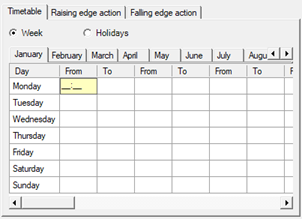
Selecting the Weekly option displays the configuration of the weekly time slots (from Monday to Sunday) of each month.
Selecting the Holiday option you can access the configuration of the time slots on holidays (special configurations relating to particular dates that prevail over ordinary planning: for example, Christmas, Easter, etc ...)
For more information on time configuration refer to the "Configuring schedule time slots" section later in this chapter.
The Entry Action and Exit Action tabs define the actions to be taken respectively at the entry and / or at the exit of each time slot defined for the scheduling:
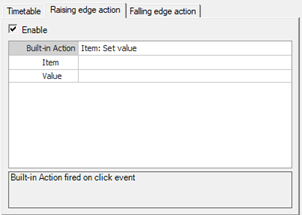
Each card contains a check box to enable the related action and the fields necessary for configuring the action. By selecting an action in the Pre built Action field, the underlying area is reorganized to allow programming of the desired action.
For the configuration of the action, refer to the instructions in the paragraph "Configuring Actions", chapter "Common editing functions" in the Basic System Guide.
The two actions can be configured and enabled independently of each other. The Enable field allows you to enable or disable the execution of the configured action.
Caution! The changes made to the schedules have immediate effect on the Manager Scheduler which will take the actions envisaged according to the specified time slots.