
Common properties for General category
The properties of the class General are common to all animation. They define the general attributes of the object.
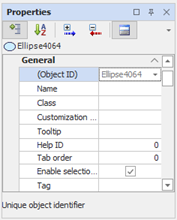
|
Object ID |
Displays the unique identifier assigned to the object automatically upon insertion. It is used to reference the animation and is not editable. |
|
Name |
Alternative symbolic identifier name, non-unique, for use mainly in scripts. An object can be retrieved by searching by name with the SearchObjectByName method of the parent object. |
|
Class |
Currently not available |
|
Customization script |
Associates a Wizard to the object, for object customization, transforming it into a Intelligent Symbol. If you have already associated a wizard, lets you edit the code. For more information, see the section Symbols Chapter Synoptic and chapter Application Wizard. |
|
Tooltip |
Specifies the tooltip (hint on the screen) that will be shown in the display by moving the mouse over the object. |
|
Help ID |
Specifies the numeric ID of the topic ("Topic") to display if Help is activated at the animation. The ID must be defined in the specified help file for the page containing the object. Currently not available |
|
Order tab |
Specifies the order in which objects become active browsing the page with the Tab key. Currently not available |
|
Enable selection board |
Allows you to disable the display of the individual object selection border if this feature is enabled in the parameters of X View. |
|
Tag |
The Tag property, available for all animations, represents a field for generic use. Allows you to store auxiliary data in text format. |