
Configuring the archive parameters and selecting the ODBC connection
- Select the Archive tab of the Group Data section.
- Enable disk recording of the sampled data by activating the Enable logging check box
- Set the ODBC option for the Format field.
- The ODBC button is enabled. Click on it to set the ODBC configuration parameters. The following illustration shows the settings entered in the Archive tab:
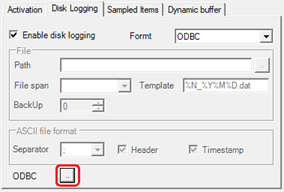
Selecting the ODBC [...] button opens the Sampling via ODBC window, shown in the following figure:
The window contains the following commands and configuration fields:
|
Parameters tab |
|
|
DSN |
Name of the ODBC connection to be used for sampling. You can type the name of an existing or existing ODBC connection, or select the name of an existing connection from the drop-down box. |
|
User ID |
Specifies the name of the user used to access the database; if you did not specify a user when creating the database, leave the entry not filled in. |
|
Password |
Specifies the password to access the database; If you did not specify a password when creating the database, leave the entry blank. |
|
Database |
Specifies the database file, existing or to be created, in which to record the sampled data. If an existing DSN has been specified, it is not necessary to fill in this field, which is used instead for the creation wizard. |
|
Driver |
Allows you to specify the specific driver for the chosen data store, to be used in place of access via ODBC, selecting it from those currently installed on the system in use. |
|
Server |
Specifies the server to use for the connection, if not using a DNS. |
|
|
|
|
Table tab |
|
|
|
|
|
Table Name |
Specifies the database table name, existing or to be created, in which the sampled data is recorded. The table name can be specified manually or selected from the drop-down list: clicking on the drop-down box displays a list of the tables in the database. |
|
Recording date / time: enable |
Enables the recording of the sampling timestamp (date and time referred to in each record) in the database |
|
DB Field |
Specifies the database field where the sampling timestamp (date + time) is to be recorded for each record. |
|
Max record number |
Specifies the number of records saved: the selected table is managed as a circular list, in which the most recent data overwrite the previously recorded data starting from the oldest one. The parameter Max record number allows to define the size of this list. |