
Selecting items and binding to db
The Sample Items tab of the Group Data section, shown in the figure, displays the list of item fields to be sampled relative to the selected sampling group.
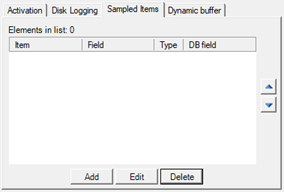
For more detailed information on managing the list (inserting, editing and deleting items) refer to chapter 2 of the Data Logger Guide.
Each sampling group item must be associated with the corresponding ODBC table field
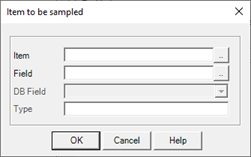
The DB Field field allows you to specify the name (identifier) of the database field in which to register the sampled value.
By selecting a database field, the Type field displays the type of data expected for the selected database field. The type of the database field must be compatible with the sampled data type (for example, the Description field of an item must be associated with a text database field).