
Copying an item
Duplication of an existing item can be obtained from the property sheet of the original item, select the Copy command in it, or directly from the Item list by choosing the Copy command from the context menu after selecting the item you want to duplicate.
In both cases, the system displays the window Copy Item:
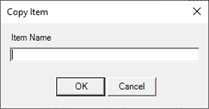
If copying takes place starting from the original item configuration, the system shows the configuration window of the new Item.
Note If you change the configuration data in an Item and then you run the copy, the changes are not saved to the current Item, but are transferred to the new item created.
Note: Once confirmed the name in the Item Copy window, the new Item is added to the database. The Cancel button in the Item configuration does not abandon the cloning operation but only abandon eventually modified data for the item.