
Deleting an item
To remove an item from the Item List choose from the context menu the Delete command or press the Delete key after selecting it.
To delete multiple items in a single command, select the  button from the toolbar of the Item list. The system displays the Delete Item window:
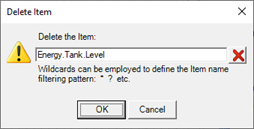
The Delete Item window is pre-populated with the name of the item currently selected. If the content of the window is not changed, pressing the button OK only the selected item is deleted; to delete more items with similar names, you can specify a string that contains "wildcard" (see "Wildcard characters" Chapter "Common editing"). To clear all items type "*".