
Creating a new page
To create a new page within the current project:
- Select the command New Page ... from the menu File.
- The system displays the window for entering the name for the new page, which must be unique:
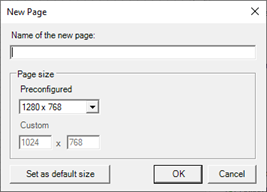
- Selecting OK a new page is generated and opened
The command New page is also available from the context menu for the node Pages in the Project window.
Note: The creation of a page actually generates the file to disk, not just a work area in memory. Therefore, if you exit the editor without saving the changes made to the page, the page file will still be present (without the changes) in the project folder.