
Custom help file
During configuration, it is possible to associate to each item of Analogic or Digital type a contextual help file containing useful information about the event, based for example on the operating manual of the plant. Selecting the Guide command of an Event List animation (if enabled) the system displays the help file associated with the item to which the selected message refers.
For example, you can associate an item to a file containing the standard troubleshooting procedures, or possible causes of alarm, realizing real contextual assistance.
Nota: animations or keyboard events for which the LstAll: Guide action has been selected, specifying a valid reference to an animation Event List, can replace the help command integrated in the list itself.
The system allows you to manage both Windows® help files (* .HLP or * .CHM), and HTML pages. Alternatively, files of different nature can be called, which will be opened with the application associated with them at the operating system level.
The project help files must be kept in the AppHelp folder of the project directory.
The help document associated with an item can be configured in the Help File section of the property window of the item itself, as shown in the following figure:
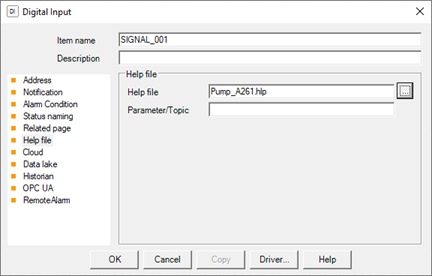
The Help file field lets you specify the name of the help file to display (complete with extension); any references to bookmarks or TopicIDs, or any other parameter required for the selected help file type, can be specified in the Parameter / Topic field.
The development of help files and the retrieval of the necessary editing tools is the responsibility of the user. For more information on creating Help files for Windows (* .hlp or * .chm), refer to the Windows SDK help or the help file for the Help Compiler used.