
Events viewer (History)
The History module (History80.exe) allows you to view the historical archives relating to events occurring in the system.
To start the History module, start the History80.exe program contained in the X Vision installation folder; from the X Editor IDE you can select Event History from the Tools menu.
The module shows the list of alarms / events recorded in the current log files, starting from the least recent:
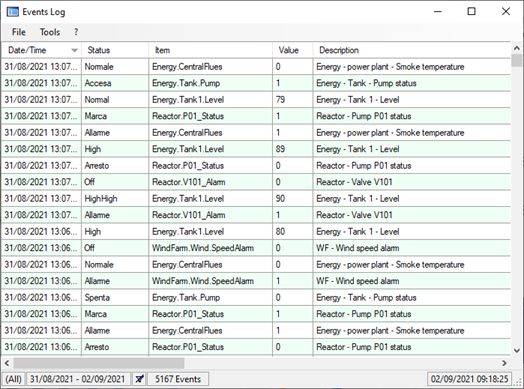
For each event the following data are shown in order:
- the date and time (in the format set in the Windows Control Panel)
- the milliseconds of the moment in which the event was received by the operator
- the state of the IEM at the time of reporting
- the name of the item that generated the report
- the value of the item at the time of reporting
- the description of the item
Note: you can select the columns to display. For more information, see the "Selecting Displayed Columns" paragraph in this chapter.