Example 1 - Control of the heating system of an office
In the example below, the scheduler is used to program the activation of fancoils in an office.
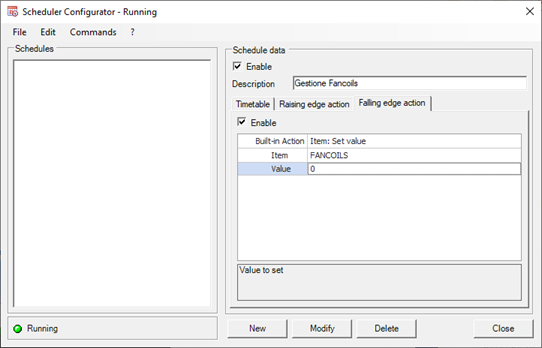
The switch-on command of the fancoils is given by setting the FANCOILS Item value to 1 while the switch-off is given by setting the value to 0.
Fancoils must be activated in the following ways:
- From November to March should be activated only from Monday to Friday from 6:00 to 18:00 (on Saturday and Sunday must be turned off).
- From April to October must be turned off all day.
- December 25 and 26 must be turned off all day.
- December 30th (inventory day) must be switched on all day.
- December 31st must only be running from 6.00am to 12.30pm.
Time slots for weekly days from November to March
The following picture shows how to configure the weekly days of the month of November (which will coincide with the configuration of the months of December, January, February and March) to get the fancoils on only from 6:00 to 18:00 from Monday to Friday .
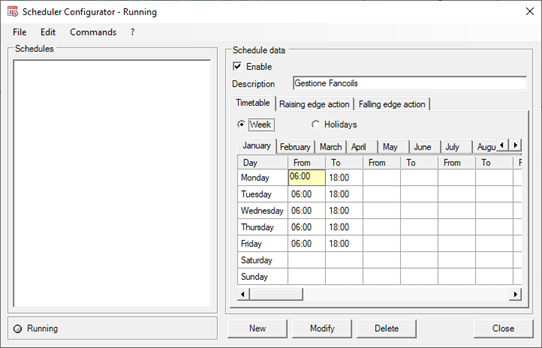
Note: for the months of November, January, February and March it is not necessary to configure times for holidays because the fancoils activation times are based only on the weekly days; it will be necessary to define activation intervals for the holidays in the month of December (configuration reported later).
Time slots for weekly days from April to October
As for the months from April to October the fancoils must remain off. No time slots should be configured (leave the grid empty).
Time slots for December holidays
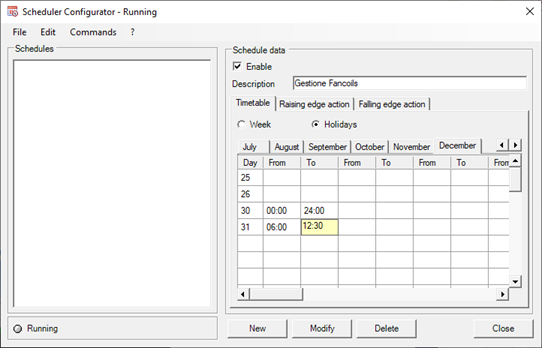
For the month of December it is necessary to define specific time slots for a few days (25, 26, 30 and 31 December) which will replace those defined for the weekly day.
The following is how to configure the time slots for:
- deactivate the fancoils for the entire day of 25 and 26.
- activate the fancoils for the whole day of 30.
- activate the fancoils from 6:00 to 12:30 on the 31st.
Time slots actions
After defining the time slots, the action performed at the entrance and exit from the time slots must be defined. The following picture shows how to configure the Schedule Action tab for:
- activate the FANCOILS item at the entrance in the time slot (setting the value to 1)
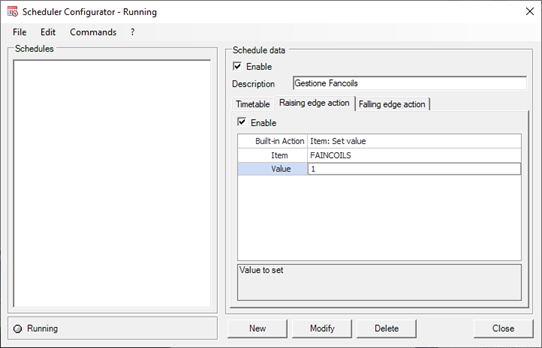
- deactivate the FANCOILS item at the exit from the time slot (setting the value to 0)