
Holidays time slots
The system allows the configuration of specific time slots for the single day of the month (holiday times) that will replace the time slots specified for the weekly days.
This type of management is particularly useful in the field of Building Management. For example, suppose you have to plan the switching on and off of the heating system of an office: the definition of the weekly time bands allows you to specify the times for activating and deactivating the users in the normal working period; the inclusion of holiday time slots allows the normal planning to be altered for the specified days, for example leaving the system switched off on Christmas day.
The system allows you to define up to 15 days of public holidays for each month and for each day up to 15 time slots.
To specify the time slots:
- Select the month tab to configure the times for.
- Select the Holiday option. The system shows the grid containing the time slots of the currently configured holiday days.
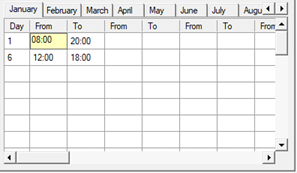
- Specify the desired intervals. For further information refer to the paragraph "Defining an activation interval" in this chapter
Caution! The times of activation of the user specified for the days of holidays invalidate, for the day, those defined in the hours of the weekly days.
The holiday day timetable grid shows, in order, the following data:
- Day of the month. Allowed values 1..31.
- Start time of the first time slot.
- End time of the first time slot.
- Start time of the second time slot.
- End time of the second time slot.
- ...
- Start time of the fifteenth time slot.
- End time of the fifteenth time slot.