
Weekly time slots
The system allows to define different time slots for each day of the week (from Monday to Sunday) of each month.
For each schedule, up to 15 time slots can be configured for each day of the week.
To specify the weekly time slots:
- Select the month tab to configure the times for.
- Select the Weekly option. The system shows the grid containing the schedules of the currently configured weekly days.
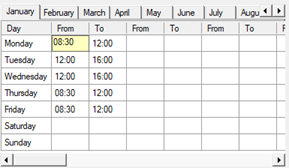
- Specify the desired intervals by defining the start and end times for each interval.
Caution! The configuration of the time slots specified for the weekly days is ignored on the holiday days that may be configured for the month.
The weekly timetable grid shows, in order, the following data:
- Day of the week (already prepared)
- Start time of the first time slot.
- End time of the first time slot.
- Start time of the second time slot.
- End time of the second time slot.
- ...
- Start time of the fifteenth time slot.
- End time of the fifteenth time slot.