
How to change language
Online language switch can be done by activating an animation, a menu or an event from keyboard configured as follows:
- Select the Language option in the Built-in Action field
- In the field Language [1 .. 16] field set the index 1 .. 16 of translation that you want to recall. The native language (which are expressed in the original texts) has index 1.
The following animation has been configured to make the change language activating the language 2:
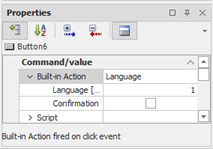
The same parameters are also available for the other control elements in the Action tab of the related property windows.
Note: the local variable $Save allows you to query the index of the current language, and can be useful to provide a display of the currently selected language (e.g. using thresholds of color, image, or text).