
Inserting available options
The List (Animations Combo and ListBox) and Options (Animations OptionButton) entries, in the Appearance category for multiple choice animations, allow you to access the configuration of the available actions, as illustrated in the picture:
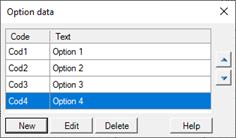
The New,Modification and Delete buttons lets you insert, modify, or remove an option. The vertical navigation buttons to the right of the list allow you to change the order of the options defined. The first option has the index 0.
Each option is defined by two properties:
|
Code |
Specifies a numeric or alphanumeric code associated with the option: It will be copied to an item when the Selection Mode is set to Code.. |
|
Text |
Text option, displayed in the animation. It will be copied to an item of type Text when the Selection Mode is set to Text. |