
Layers
The objects contained on a page can be organized on different drawing plans, or Layers. Each layer identifies a logical level of objects, which can be displayed or hidden in both the design phase that dynamically.
By default a new object is always placed on layer 0, which represents the generic drawing plane and is always visible. In addition to the drawing plane are 32 standard Layers, which can be associated with objects inserted.
The property Layer allows you to assign the object to a layer.
Hiding or displaying a layer, the objects associated with it are respectively made invisible or visible
Note: Belonging to a layer does not affect the order of overlapping objects
The tools Layer1  Layer8 ..
  allow you to quickly show or hide the first eight layers available, usually sufficient in most applications. A more comprehensive management is permitted by the Layer window, which also allows you to associate a description to each layer:
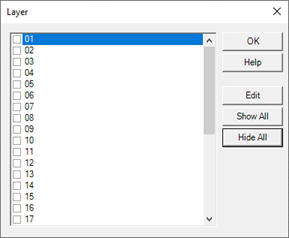
The check mark next to the layer defines its visibility, while the Edit command allows you to specify the description.
In the visualization phase the visibility of the layers is controlled by the expression associated to the visible Layer property of the page: this property represents a numerical value that expresses the visibility mask of the layers: to each bit of the expression result corresponds the visibility status of the respective level number. The least significant bit corresponds to the first level.
For example: an expression that evaluates to 3 (11 in binary) enables the display of the first and second hidden layer, leaving the others. Similarly, an expression that evaluates to 2 (10 binary) only enables the display of layers 2, making it invisible layer 1 and layer 3 to 32)