
Modifying symbols texts
The function Texts Inspector allows you to quickly view and edit the fixed texts of the elements in a group / symbol or just the selected objects.
The Texts Inspector is activated by selecting the command Texts inspector... from the menu Animations or from the context menu, and consists of a table that displays the fixed text of each object belonging to the group or selected, as in the example below:
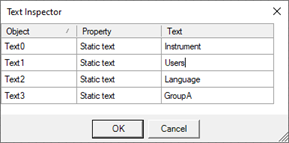
By changing the content of the column Text you can vary the fixed text of any element within a symbol, group, or selection of objects.
Note: The references of the individual constituents can also be changed using Page Inspector on them. For more information, see par."Changing of the elements within a group"