
Modifying symbols references
Creating a symbol, all the static properties and animation related to each constituent element is preserved. Therefore, a symbol can reference specific items of the current project, those might be used to create animation functions.
The function Explore References allows you to quickly view and edit references to items found in a symbol, both being created that at the time of insertion in the synoptic.
The References Inspector consists of a table in which they are listed, for each object constituting the symbol, all the items or expressions may be referenced, as in the example below:
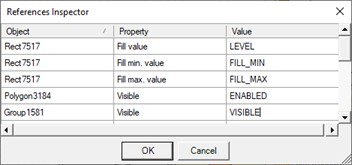
By properly changing the content of the Value column you can fix the references.
The References Inspector is activated automatically upon insertion of a symbol on screen, if the symbol is not defined customization script (cf. "Intelligent Symbols")
You can also use this tool to explore the references of any single object or group of objects on the page, by selecting the command Explore References from the menu Animations or from the context menu.
The References command button allows you to explore the references of the selected symbol in the gallery. In this case, the validation checks of the inserted expressions are not carried out on confirmation of changes, allowing the replacement of an expression or an item with a generic descriptive text to be replaced at the time of insertion.
Note: References that may exist in scripts are not inspected.
Note: references of individual constituent elements can be edited also using the Page Inspector. For more information, see "Modifying elements within a group”.