
Override
To override the programmed value of a recipe element proceed as follows:
- Select the item you want to alter.
- Select New Value from the Commands menu, or double-click on the selected item.
- The system shows a window containing the currently programmed value, the limits of the allowed variation and the input field of the new value, as shown in the figure:
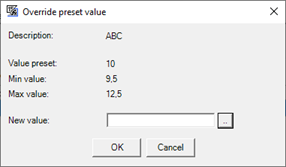
- Enter the new value and press OK to confirm the entry. The system validates the input on the basis of the programmed limits (only for numerical values).
- The new set value is displayed in the New Value column. In case of sending (Download) the new value will be used in place of the programmed value.
By saving the recipe, the new values eventually specified for the elements contained in it become effective by replacing the previous programmed values.
By closing the recipe without saving it, the new values will be ignored, even if they have been used for Download.