
Printer setup (Print tab)
The Trend objects are able to independently perform printing the displayed graphics. Print settings can be configured by changing the properties defined in the Print tab of the properties of the graph:
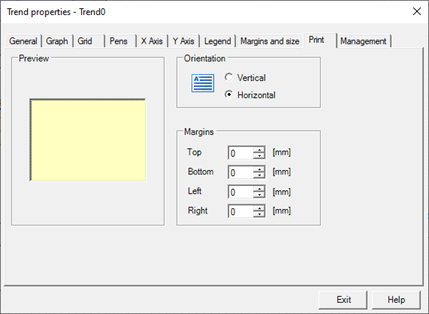
The Print tab contains the following configuration fields:
|
Preview area |
Preview of the page showing the result of the changes the orientation and margins |
|
Orientation |
|
|
Vertical |
If selected sets portrait orientation. The Horizontal and Vertical options are mutually exclusive. |
|
Horizontal |
If you selected sets the horizontal orientation. The Horizontal and Vertical options are mutually exclusive. |
|
Margins |
|
|
Top |
Specifies the size of the top margin, i.e. the distance in mm between the upper edge of the graph and the top edge of the page. |
|
Bottom |
Specifies the size of the bottom margin, i.e. the minimum distance, in millimeters, between the lower edge of the printed area and the lower edge of the page. |
|
Left |
Specifies the size of the left margin, i.e. the distance in mm between the left edge of the graph and the left edge of the page. |
|
Right |
Specifies the right margin dimension, i.e. the minimum distance, in millimeters, between the right edge of the printed area and the right edge of the page. |