
RealTime Database Editor
The editor of the RealTime Database allows you to view the list of Items and perform all the operations of creation, modification, deletion, and search.
To display the editor window of the database within the development of X Editor, select the command Item List from the menu Database.
The system displays the Item List window:
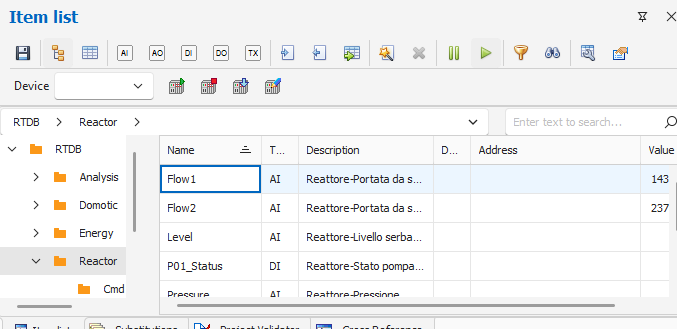
The window can be kept visible during development and eventually be anchored and / or set as a pop-up window.
Tools for Items List window
The Item List window has a toolbar that provides the following commands:
|
|
Save Database content to disk |
|
|
Insert an Item of type Analog Input |
|
|
Insert an Item Type Analog Output |
|
|
Insert an Item of type Digital Input |
|
|
Insert an Item Type Digital Output |
|
|
Insert an Item of type Text |
|
|
Automatic Items Generation |
|
|
Delete one or more Item |
|
|
Enable / Disable automatic values update |
|
|
Search by Item name |
|
|
Filter by Item name |
|
|
Setting grid columns |
|
|
Database Properties |


Some functions are also available from the context menu:
|
- |
New |
Insert a new item of the selected type |
|
|
Edit ... |
Open the properties window of the item |
|
|
Copy ... |
Duplicate the selected item |
|
|
Delete |
Delete of the selected item |
|
|
Search for ... |
Search for an item |

