Security configuration
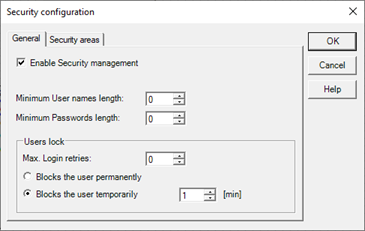
In a new project, security management is enabled by default. To change the enabling status of the security manager and to configure the general parameters, select the Security item from the Configure menu: the system displays the dialog shown in the figure:
General tab
The General tab contains the general configuration parameters of the security management system:
|
Enable security management |
If selected, enables system security management, making the access restrictions set effective; disabling the management, the system does not check the access restrictions set, allowing full operation to any user and / or in the absence of a connected user. |
|
User name minimum length |
Specifies the minimum length of a user name. |
|
Minimum password length |
Specifies the minimum length of the password. Entering a value other than 0, the system prevents a user to define an access keyword (password) of length less than the specified number of characters, both in development phase, which at run-time. |
|
Maximum login retries |
By specifying a value other than 0, the system locks a user who has made a number of attempts to login with incorrect password equal to that specified. |
Security Areas tab
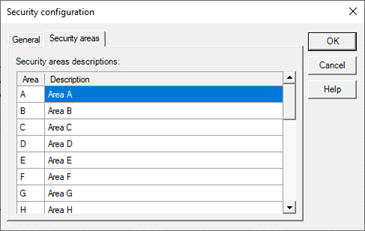
The Security Areas tab allows you to define descriptions for the 27 security zones (identified by the letters A to Z) available in the system.
These data are purely descriptive and allow to identify more easily the areas in the configuration phase of access restrictions on the command elements.