
Selecting color
The objects of the synoptic are generally characterized by the following color properties:
- Line color: is applied to the line of the selected object
- Foreground color: is applied to the text of the selected object
- Background color: is applied to the background of the selected object
- Fill Color: is applied to the fill pattern of the animation; it is also used for filling the dynamic animation (bar graph effect).
It is possible to select colors using the property grid, or by selecting a color from the palette or by tools of the format toolbar.
In the property grid all attributes of color have a Color Picker for color definition, which is activated by selecting the button "..." next to the field. Next to the property is shown a sample of the current color and the RGB components of the same.
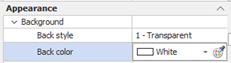
You can transfer the settings of color of an object to other objects by copying and pasting the RGB components displayed in the color you want using the appropriate context menu.
You can also pick up the color directly from any area of the screen by pressing the right mouse button on the color property you want to set and then releasing it at a screen area of the desired color (during the operation, the mouse pointer changes the form of a dropper:  ).
).
The default colors palette can be displayed by selecting the command Colors Palette from the View menu. Allows you to apply to the selected object one of the 48 predefined colors. The color choice can be applied as background color, foreground or filling depending on the mouse button used for selection:
|
Left button |
Background color |
|
Middle button |
Fill Color |
|
Right |
Foreground Color |
The selection of the color can also be done through the selectors in the toolbar Format:
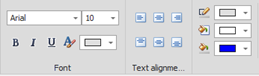
In the colored band on the lower part of the icon of each of the three tools is shown the the last selected color. To apply the current color click on the icon. To select a different color, click the drop-down menu to the right of the icon, which allows you to view the color palette defaults:
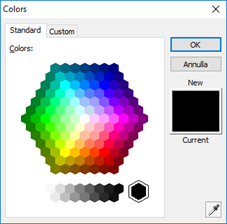
The tools have an effect on the selected objects. If no object is selected, the background color is applied to the page