
Actions configuration
Actions can be configured for animations inside pages, events from the keyboard, Menu items, Events and the Schedules.
The term action means to perform a specific function on event or command of the operator.
Most of the commonly used functions are available as predefined set of "Bilt-in" Actions. In most cases the planning of action is therefore reduced in the selection of the desired function and the possible configuration parameters. Specific functions can also be implemented with a script. In the case of the animations can be used in parallel with the script object and event management built-in actions; in all other cases, the execution of a script is alternative to the use of one or more built-in actions.
To perform multiple Built-in actions in sequence, you can define a List of actions.
As for the animation, the fields for the configuration of the action are available in the Properties window, in the category Command / Value; for all the other elements are available in the related configuration windows, under Action.
The configuration is similar for all of the control elements
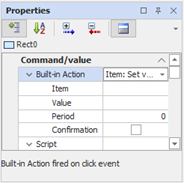
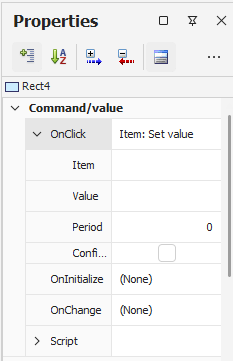
The configuration fields for the action are as follows:
|
Built-in Action |
Allows you to select a default action, or set up a list of actions or a script. The option Action List may not be available for some elements of command; option Script not be selected for the objects of the synoptic, because for this type of objects are managed event scripts in parallel with the Built-in action. |
|
(Parameters) |
Depending on the action selected are made available one or more fields that allow the configuration to define the parameters of execution: for example, for the action Item Set, the name of the item to be set and the value to which to set it. |
|
Period |
Specifies the repetition period of the action, expressed in milliseconds. If 0, the action is executed only once when you press the mouse; if not 0, the action is repeated with the period indicated as long as the mouse button is pressed. According to the type of control element and the action selected, this parameter may not be available. |
|
Confirmation |
If selected, the execution of the action associated with it is subject to confirmation by the operator. According to the type of control element and the action selected, this parameter may not be available. If Period is set to a value other than 0 (repeat action) this setting is ignored. |
A detailed description of the available actions and their configuration parameters can be found in Appendix "Actions"In this guide.