
Analog Input item type
An Item of Analog Input Type represents a physical or logical point, connected to an analog measure monitored by the system.
The configuration of parameters specific to the Analog type let you define how process the value of the Item. In particular, it is possible to define:
- thresholds generation of alarms and the relative dead band
- the unit of measure and the scale value of the Item
This icon marks the tool that allows the insertion of an AI item:

The data specific to an Item of Analog Input type are:
Alarm Thresholds Category
|
LL threshold |
Specifies the threshold value below which an alarm is generated as extremely low threshold. To disable this threshold uncheck the related enable checkbox. |
|
L threshold |
Specifies the threshold value below which an alarm is generated threshold Low. To disable this threshold uncheck the related enable checkbox. |
|
H threshold |
Indicates the threshold above which an alarm is generated threshold High. To disable this threshold uncheck the related enable checkbox. |
|
HH threshold |
Indicates the threshold above which an alarm is generated threshold High High. To disable this threshold, uncheck the related enable checkbox. |
|
Dead band |
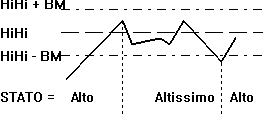
Indicates the maximum deviation (positive or negative) of the value of the item compared to a threshold value, within which there is no change of state. For example, assume that the HH threshold is 100 and the Dead Band is 10. If the value reaches 100, the Item item changes to High High state, and the corresponding alarm is generated. After alarm acknowledgment, the value decreases to 95 and then back to 100. Given that the variation did not exceed the limit indicated by the Dead Band (± 10), the Item does not change the state (no new alarm is generated). When the value decreases further past the limit of the dead band (e.g. reduced to 87), the point changes state and an HI alarm is generated.
Note: when L = LL = HH = H = 0, the status is not computed. |
Deviation Category
|
Enable |
Enables the management of the deviation on the value of the item. |
|
Minimum |
Minimum value of the item, under which the state becomes deviation and an alarm is generated. |
|
Maximum |
Maximum value of the Item, above which the state becomes deviation and an alarm is generated. |
|
Dead Band |
Indicates the maximum difference (positive or negative) of the value of the item, within which there is not a change of state. |
Rate of Change Category
|
Enable |
Enables the management of the change in the value of the item. |
|
Rate of Change |
Maximum change in the value of the item in the specified time. Beyond this threshold, the status becomes Variation and an alarm will be generated. |
|
Interval |
Time interval (in milliseconds) for the verification of the change of the Item value. |
Scale Category
|
Unit |
Indicates the unit of measure (e.g.. KV, psi, rpm ...). |
|
Min value |
Minimum value that can take on the Item, under which the status becomes Out of Range and an alarm will be generated. |
|
Max Value |
Maximum value that can take on the Item, above which the status becomes Out of Scale and an alarm will be generated. |
|
Ratio |
Specifies the multiplication factor of the Item value. For more information, please refer to the driver guide. |
|
Bias |
Indicates the offset of the Item value after multiplication by the factor entered in field Ratio. For more information, please refer to the driver guide. |
Note If the minimum value and the maximum value is equal to zero, there is no check made to Out of Range, and will not be given any warning.