
Choose translation languages
The system allows you to define up to fifteen languages in addition to their mother tongue, for a total of 16 available languages . The texts of the mother tongue are compiled by the export procedure and are not otherwise changed, as they are the original terms to translate. The native language is always the language 1.
The fifteen additional languages can be selected from the available locales in the operating system. Although the system permits the introduction of the translations into 16 columns without having defined the language represented by each of them, it is always appropriate to identify the language used: the selection of a language system makes it possible to correctly represent the texts. For this reason, you should also check the setting of the mother tongue, which should be consistent with the language used for the development of the interface.
The language selection, always recommended, it is indeed essential to handle languages that use non-Latin alphabets.
To identify the languages used to select the button Languages in the Languages window. The system displays the Select languages translation window:
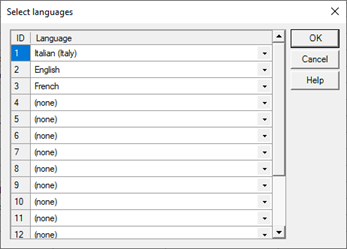
To change the language associated with a translation simply double-click in the Language column corresponding to the translation identifier you want to configure, then select the desired language from the pop-up box.
It is not necessary to fill in unused translations.