
Color thresholds
The dynamic variation of the color of an object (background, filling, line) is controlled by expressions. The current value of the expression is compared with the thresholds of color and the color of the object is changed accordingly.
Selecting the "..." button of the Color or Color thresholds property you access the thresholds configuration window:
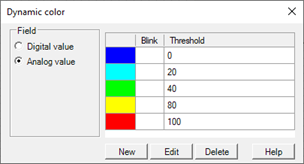
The Field options group allow you to specify the type of thresholds to manage:
|
Digital value |
Two thresholds are managed according to the discrete value ON / OFF (0/1) evaluated by the expression. |
|
Analog value |
You can manage a virtually unlimited number of thresholds, defining the values that delimit each threshold. |
The table in the right part of the window displays the configured thresholds. The thresholds can be added, modified or deleted with the buttons below.
Note: for correct operation it is necessary that they are always defined at least two different thresholds, otherwise it is not possible to calculate any change.
The creation or modification of a threshold occurs by configuring appropriately the properties through the Threshold data color window:
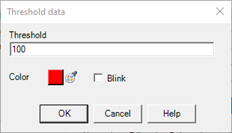
The properties that define a threshold are:
|
Threshold |
Value against which the transition occurs |
|
Color |
Color assumed by the animation for the transition |
|
Blink |
If enabled, causes the flashing (background, line or fill, according to the component that is animated) when the value falls within the configured threshold. |
A threshold becomes active when the value of the expression is connected between the configured threshold value and:
- the value of upper threshold, if the value of the expression is greater than the threshold value
- the value of lower threshold, if the value of the expression is less than the threshold value
If the value of the expression exceeds the minimum threshold, then the minimum threshold is activated. If it exceeds the maximum threshold, then the maximum threshold is activated.