
Common Properties for Slider category, and use of slider functionalities
The properties of the Slider class allow you to configure the object as a cursor (Slider): i.e. it allows to make the object draggable by mouse vertically, horizontally, or along both directions, consequently varying the value of an item.
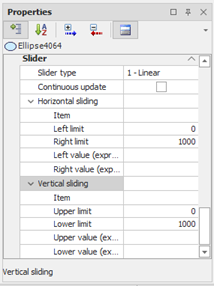
For each direction, you can define the extent of the displacement in both verses, and the values corresponding to the two extremes.
|
Slider type |
Slider management method. Possible choices:
|
|
Continuous update |
Specifies whether the value of the items connected to the slider is updated continuously as the position of the object changes or only when the mouse is released. If the item is directly connected to the device may be advisable in some cases to set this property to FALSE: in this way sends a single command when the mouse button is released. Otherwise, the value is written anytime the object is moved. |
Horizontal sliding
|
Item |
Name of the Item connected to the horizontal displacement of the object. The value of this item determines the horizontal position of the object and changes according to the position assumed by the object itself when it is dragged horizontally. |
|
Left limit |
Determines the maximum displacement of the object to the left, relative to the current position of the center of the object. |
|
Right limit |
Determines the maximum displacement of the object to the right, compared to the current position of the center of the object. |
|
Left value (expression) |
Specifies the value assumed by the item connected to the horizontal displacement when the object is located to the left edge of the drag. You can enter a constant (e.g. 0) or an expression to dynamically calculate this value. |
|
Right value (expression) |
Specifies the value assumed by the item connected to the horizontal displacement when the object is located on the right edge of the drag. You can input a constant (e.g., 100) or an expression to dynamically evaluate this value. |
Vertical Sliding
|
Item |
Item connected to the vertical displacement of the object. The value of this item determines the vertical position of the object and is changed according to the position assumed by the object itself when it is dragged vertically. |
|
Moving on up |
Determines the maximum displacement of the object towards the top, relative to the current position of the center of the object itself. |
|
Move down |
Determines the maximum displacement of the object downwards, with respect to the current position of the center of the object. |
|
High Value (expression) |
Specifies the value assumed by the item connected to the vertical displacement when the object is located at the upper end of the drag. You can enter a constant (e.g. 0) or an expression to dynamically calculate this value. |
|
Low value (expression) |
Specifies the value assumed by the item connected to the vertical displacement when the object is located at the lower end of the drag. You can input a constant (e.g., 100) or an expression to dynamically evaluate this value. |
Limitations for slider
The dragging has no effect in the following cases:
- Item field relative to the direction of dragging has not been filled in
- limits of displacement along the direction of dragging has not been specified or coincide
- values for the extremes of the movement were not specified or coincide.
When the object is configured to operate as a slider and it is contained within a group, it should be noted that for the proper management of dragging is necessary that the limits of displacement does not exceed the size of the group in which the object is contained .
Object configured for operation as a slider cannot be rotated (both initial and dynamic rotation).