
Common Properties for Appearance category
The properties of the Appearance group allow you to configure the general appearance of the animation; some attributes may be dynamically controlled by expression.
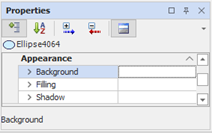
Background and dynamic background color
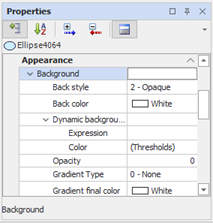
The properties of the Background group allow you to change the appearance of the animation background , specifying the color and applying gradients and transparencies.
To this group belong also the properties that allow to dynamically change the background color of the animation according to the value assumed by an expression, defining thresholds for variation.
This group of properties is not available for animation without a background (Line, Polyline, area, etc.). also some settings may not be available for all animations
|
Back Style |
It allows you to make the background completely transparent. Possible choices:
|
|
|
Back Color |
Allows you to select the background color. If Gradient type is other than "None", this color is used as the starting color of the gradient. |
|
|
Dynamic background color expression |
||
|
|
Specifies the expression to control the background color. |
|
|
Color |
Opens the configuration form of color thresholds. For details about configuring thresholds, See "Thresholds Color" later in this chapter. |
|
|
|
|
|
|
Transparency |
Allows you to apply the semi-transparent effect to the object, specifying the opacity value. Allowed values: 0 | 1 .. 255. A value of 0 disables the function of transparency; the value 1 corresponds to total transparency, 255 to total opacity. |
|
|
Gradient Type |
Allows you to apply a gradient to the background, i.e. a transition from Background color a Gradient Final color. Possible choices: |
|
|
|
|
|
Gradient Final color |
Allows you to select the final color of the gradient. If Gradient Type is set to "None", this setting has no effect. |
|
Filling and Dynamic filling
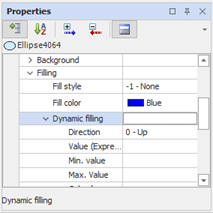
The properties of the Filling group allow you to specify the color and fill style for the animation.
The filling consists of a texture or a color partially overlapping the background color. Can be dynamically controlled by an expression to create a histogram.
|
Fill Style |
Specifies the fill pattern applied. If set to "None" fill settings will not affect static and dynamic. Possible choices: |
|
|
|
|
|
Fill Color |
Allows you to select the color of the fill pattern. If Fill Style is set to "None", this setting has no effect. |
|
|
Dynamic Fill |
Specifies the direction of the fill. Possible choices: |
|
|
|
|
|
|
|
Value (Expression) |
Allows you to specify the expression that defines the percentage of fill. |
|
|
|
Minimum value |
Specifies the value of the lower limit of the scale. You can enter a constant (e.g. 0) or an expression to dynamically calculate this value. |
|
|
|
Maximum value |
Specifies the value of upper limit of the scale. You can input a constant (e.g., 100) or an expression to dynamically calculate this value. |
|
|
|
Color (expression) |
Specifies the expression that dynamically controls the fill color. |
|
|
|
Color Thresholds |
Opens the configuration form for color thresholds. For details about configuring the thresholds See "Thresholds Color" below this section |
|
|
Shading
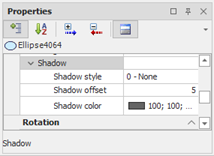
The properties of the Shading group allow you to apply shading to the animation, creating a lifting effect to the plane of the synoptic.
|
Shadow style |
Specifies the position of the shadow from the object. If set to "None" shading is absent. |
|
Shadow offset |
Specifies the width of the shadow. By changing the offset, you can create the illusion of a more or less vertical distance from the floor below. |
|
Shadow Color |
Select the color of the shadow of the object. If Shading style is set to "None", this setting has no effect. |