
Common Properties for Line category
The properties of the Line class, where applicable, define the appearance of the border of the animation; there are also properties that allow you to dynamically change the border color of the animation based on the value taken from an expression, by defining thresholds for variation.
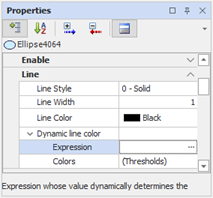
|
Border style |
Sets the border style, allowing you to choose between a standard (flat) or three-dimensional effect. Possible choices:
|
|
|
3D border style |
Specifies which three-dimensional effect to apply to the border, if Border style is set to "3D" Possible choices: |
|
|
|
|
|
Line Style |
Specifies the line style of the border (dotted, dot, etc ....). If set to "None" the line will not be displayed. Possible choices: |
|
|
|
|
|
Line Width |
Indicates the thickness in pixel the border. A value of 0 is not allowed: to remove the border act on the property Line Style (V.) |
|
|
Color Line |
Allows you to select the line color of the border. |
|
Dynamic color
|
Expression |
Specifies the expression to control the color to the line. |
|
Color |
Opens the configuration form of color thresholds. For details about configuring thresholds See "Color Thresholds "Later in this chapter. |