
Common Properties for Text category
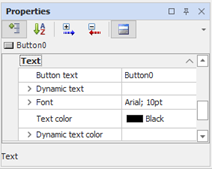
The properties of the Text group, where applicable, define the appearance of the animation text. Text properties allow you to dynamically control the color of the text depending on the value computed by an expression.
|
Text Color |
Allows you to select the color of the text. |
Font
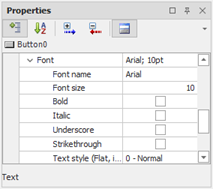
The group Font contains the properties to configure the font for the text. This group is available only for animations that have one or more text elements (e.g., texts, buttons, lists, Events, etc..).
|
Font |
View current font and size. The button allows you to access the Windows default font configuration. |
|
Font Name |
Allows you to select the font type from a drop-down list |
|
Size |
Specifies the font size, in points. |
|
Bold |
Allows you to apply the Bold style |
|
Italics |
Allows you to apply the italics style |
|
Underline |
Allows you to apply the underline style |
|
Strikethrough |
Allows you to apply strikethrough style |
|
Text Style |
Allows you to apply a three-dimensional style to the text. Possible choices:
|
Dynamic text color
|
Expression |
Specifies the expression to control the text color. |
|
Color |
Opens the color threshold configuration window. For details about configuring thresholds, See "Color Thresholds" below in this chapter. |