
Configuring the Audio driver
The Audio Driver manages the execution of alarm audio files through the sound system connected to the computer. Each alarm message can be preceded by a differentiated call sound based on the alarm priority.
The alarm notifications intended for sending to the sound broadcast are queued by the alarm remoting system in the driver queue. The driver then proceeds to the decoding and for each alarm extracted from the queue proceeds, in order, to the execution of the following operations:
- Execution of the recall sound associated with the alarm priority (defined in the driver configuration window)
- Execution of the alarm notification message (defined in the alarm configuration window)
Note: Audio Driver manages the sound file format Audio Wave (*. wav)
To access the audio driver configuration window select the Audio Driver Configuration command from the Remote Alarm submenu of the Configure menu of X Editor. The configuration window is shown in the following figure:
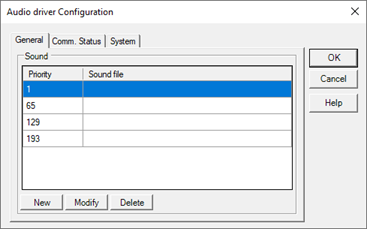
General tab
Specify the general parameters of the driver:
|
Sound |
Specifies the sound file to be executed prior to the call which sound the alarm message. You can specify different sounds based on the priority of the alarm. |
|
|
Priority |
Specifies the threshold of alarm priority |
|
|
Sound files |
Specifies the recall sound for alarms with priority included in the defined interval |
|
Communication status tab
Specifies the parameters for managing the communication status of the driver:
|
Item Name |
Specifies the name of the item used to display the communication status of the driver. The driver sets the item value to 1 item if the controlled device does not respond. |