
Configuring the SMS driver
The SMS Driver manages the sending of alarm messages in alphanumeric format to GSM or compatible terminals, with SMS (Short Messaging System) technology
Alarm messages intended for notification by SMS are queued in the driver queue by the Remote Alarm system. The driver then proceeds to the decoding and for each alarm extracted from the queue proceeds, in order, to the execution of the following operations:
- Open the serial port to which the modem is connected
- Send the alarm message
- Wait for confirmation of transmission by the modem
- Close the serial port
Important: Driver SMS requires a GSM modem.
To access the audio driver configuration window select the SMS Driver Configuration command from the Remote Alarm submenu of the Configure menu of X Editor. The configuration window is shown in the following figure:
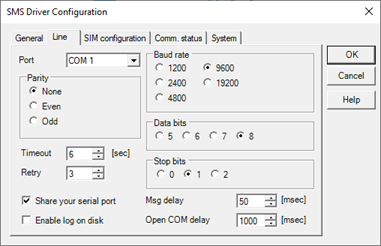
Line tab
The Line tab contains the configuration parameters for the serial port where the modem is connected
|
Port |
Specifies the port Com 1 .. 16 connected to the modem |
|
Baud rate |
Specifies the communication speed on the serial port. The parameter is not modifiable
|
|
Paity |
Specifies the type of parity is used do control. The parameter is not modifiable. |
|
Data Bits |
Specifies the number of data bits. The parameter is not modifiable |
|
Stop Bits |
Specifies the number of stop bits. The parameter is not modifiable. |
|
Timeout |
Specifies the period of waiting for the response from the modem |
|
Retry |
Specifies the number of transmission retries before declaring the communication failed. |
SIM tab
The SIM configuratio tab allows you to change the configuration parameters of the SIM card used by the GSM modem.
|
PIN code |
Card PIN code. Required if the card is configured so that the calling and sending messages is subject to the placing of the PIN. |
|
PUK code |
PUK code |
|
Message Center |
Telephone number of the Service Center for sending messages. If not known, contact your Manager. |
Communication status tab
Specifies the parameters for managing the communication status of the driver:
|
Item Name |
Specifies the name of the item used to display the communication status of the driver. The driver sets this item to 1 if the controlled device does not respond. |