
Configuring the E-mail driver
The E-mail Driver manages the sending of alarm messages by means of emails.
Alarm messages intended for notification by email are queued in the driver queue by the Remote Alarm system. The driver then proceeds to the decoding and for each alarm extracted from the queue.
To access the audio driver configuration window select the E-Mail Driver Configuration command from the Remote Alarm submenu of the Configure menu of X Editor. The configuration window is shown in the following figure:
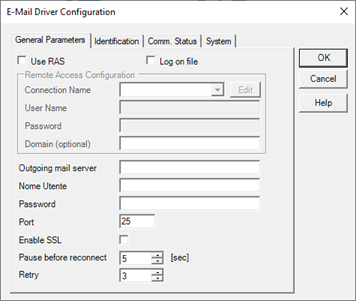
General Parameters tab
The General Parameters tab allows you to configure the general parameters of the driver.
|
Use RAS |
If selected, enables the use of dial-up (RAS) to connect to the mail server. Clear the field if the mail server is on your local network (LAN). |
|
Connection Name |
Specifies the name of the connection to use to connect to the desired provider using Remote Access |
|
Username |
Displays the user name configured for the selected RAS connection |
|
Password |
See the password specified for the selected RAS connection |
|
Domain |
Specifies the domain of the connection (optional) |
|
Outgoing Mail Server |
Specifies the name of the outgoing mail server. If not known, please contact the provider. |
|
Pause before reconnecting |
Specifies the length of time (in seconds) between attempts to connect to your ISP and the next in the event of failure. |
|
Retry |
Specifies the maximum number of retries to be sent in the event of a failure before declaring the transmission failed. |
|
Log on file |
If selected, it enables the recording of the operations performed by the driver on a file of daily duration. The log file is registered in the \ Log subdirectory of the current project directory with the name: EMAIL <YYYYMMDD>. Log Note: The erasure of the log file is left to the operator |
Identification tab
Identification tab configure the identification information of the sender of the messages.
|
Sender's Name |
Specifies the name of the sender (descriptive data) |
|
E-mail Sender |
Specifies the e-mail address of the sender, which must be accredited (registered) in the outgoing mail server. |
Communication status tab
Specifies the parameters for managing the communication status of the driver:
|
Item Name |
Specifies the name of the item used to display the communication status of the driver. The driver sets this item to 1 if the controlled device does not respond. |