
Database properties
The Realtime Database Properties window, called up by selecting the command  in the toolbar of the Item List window, allows you to view the general properties of the database: file location, number of items allocated, used (total and by type) and available items, the number of licensed credits, used and available count.
The Realtime Properties Database window is illustrated in the following picture:
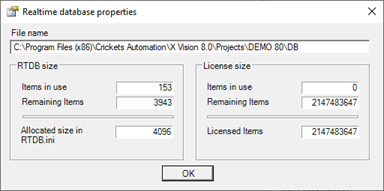
The Database size section shows the usage statistics of items:
|
...Item Count |
Displays the number of items used for each type. |
|
Items in use |
Displays the total number of items used. |
|
Remaining items |
Displays the number of items that can still be defined by the current setting of allocation.
|
|
Total allocation size |
Displays the number of items allocated in memory. For more information see "Limiting the maximum number of items allocated in memory". |
The Licensed Credits section displays the statistics on the use of licensed credits.
|
User credits for…
|
Displays the number of credits used for each type of item |
|
Credits in use |
Displays the total number of credits used, which allows to determine the size of license required for the project. |
|
Remaining credits |
View the number of remaining credits in accordance with the license currently installed. |
|
Licensed Credits |
Displays the number of licensed credits. |