
Demo mode
At project startup is verified the presence of the security key. If the key is not plugged correctly, the system requires confirmation to be activated in DEMO mode:
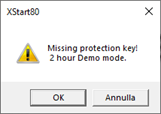
Select OK to boot the system in demo mode; select Cancel to exit the program.
The DEMO version allows full access to the functions of all modules in the system for a period limited to two hours. At the end of that period you can save the project and re-start the system to begin a new session.