
Editing objects within a group
Thanks to the function of Page Inspector you can change the properties of individual objects forming a group without modifying or separate the group.
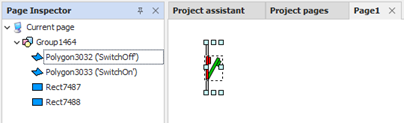
The Page Inspector window displays and allows you to select all objects on the page, representing the grouped objects in a hierarchical form. Selecting an object belonging to a group can be viewed and edited the properties of the object without separating or alter the group they belong to other objects inside.
The parent group is selected using the resize handles, while the active object is highlighted by a dashed box, as shown in the figure:
The drill down mode is automatically abandoned when the selection changes.
Note: changing the properties of an object through the functionality of Page Inspector can be achieved only through the Property grid: menu commands and toolbar operate on the main object.
Note: the changes in Page Inspector cannot be undone or redone.
Note:Page Inspection function does not allow you to alter the structure of the object so it is not possible to separate any groups contained therein.