
Event List specific properties: Columns category
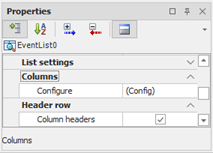
The Columns category allows you to define the layout of the list columns.
|
Columns header |
Specifies whether to show columns header. |
|
(Configuration) |
Allows access to the configuration window of the columns, in which you can define the order and visibility of the columns, as described in Configuring Columns. |
Columns configuration
The Configuring columns widnows lets you define the columns order and width:
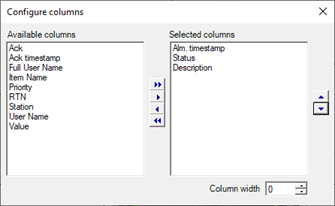
The Available Columns displays the available columns, while the list Selected Columns shows the columns that will be displayed in the list, in order of appearance.
To add a column move from Available Columns lsit to the Selected Fields list using the buttons. To change the display order using the navigation buttons shown to the right of the Selected Columns list.
The Column Width field specifies the width of the selected column in pixel.