
Event List specific properties: List Data category
The properties of the Data List category allow you to configure the execution of the animation and the general display options.
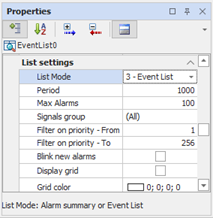
|
List Mode |
Defines the function of the list; You can select one of the following options:
|
|
Period |
Specifies the period of updating the list, in milliseconds, and independent of the synoptic periodic refresh. |
|
Max Alarms |
Specifies the maximum number of alarms or events displayed in the list, starting with the most recent. The value can not exceed the size of the Queue Alarms Summary Queue for List Type = "Summary Alarm" or Event Queue for List Type = "Historical Events" set in Alarms Configuration. (See "Configuration of the alarm management system"In the chapter "Alarm Management"). |
|
Group Filter |
Set the filter for the Signal Group, allowing you to view alarms or events from only the selected group or all groups. For more information about Signal Groups see chap. "Alarm Management. " |
|
Filter Priority - From .. A |
Display Filter. At runtime will display only alarms with priority within the specified range. For example, setting Filter Priority - From to 1 and Filter Priorities - To 100, the list will display only the alarms with priority between 1 and 100, including, but will not be visible alarms prioritized by 101 to 256. |
|
Flashing new alarms |
It allows you to highlight the unacknowledged alarms in an alarm summary by flashing. It has no effect if the Type List is set to "Event List" |
|
Show Grid |
Sets the visibility of the grid lines |
|
Color Grid Lines |
Allows you to select the color of the grid lines. |