
Event List specific properties: Commands category
The properties of the Commands category allow you to configure list management commands available to the user during visualization. These commands are made available as a pop-up menu activated by clicking with the right button on the animation.
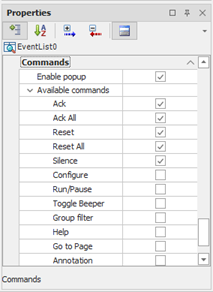
|
Enable Popup |
Enable context menu, which will contain the commands enabled voice Displaying Commands |
|
Available Commands |
Specifies which commands are available in the context menu. For a description of the functions of the controls and the interaction with the list at run time, see "Using the Events List animation" in the chapter"Alarm Management" |