
How to create a symbol
The collection of symbols provided can be enriched with specific symbols created by the user. After building the desired object by configuring animations available you can register it in a symbol as follows:
- Select all items that are part of the symbol
- Select the command Create Symbol the voice Symbols Menu Animations or the context menu.
- or -
If the Symbols Library window is visible, select it in the command Create Symbol - The system displays the window Create Symbol:
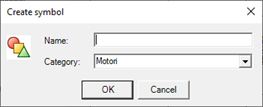
Specify the name of the symbol, then specify the name of the category by selecting an existing category from the dropdown list or by typing the name of a new category, it will automatically be created.
The symbol name must be unique within the category.
- Confirm with OK to create the new symbol in the specified category. The system automatically displays the window of the Symbols gallery highlighting the inserted symbol.
After adding a symbol to the Symbols Library you can replace the items and expressions referenced in the symbol, for example by inserting descriptive texts that allow to identify the function. To view and change the references to the symbol, select the command Symbol Properties, which activates the References Explorer for the selected symbol (for more information see "Changing references to a symbol").